How to Add Furigana to a Japanese PDF
2026-07-31
The quickest way to add furigana to a Japanese PDF is to upload it to Mooon, then click Add Furigana. Mooon recognizes the text and its reading order, rebuilds the content as a Mooon Doc, and adds readings above the corresponding words. The result is not a flattened annotated copy: you can correct the text and readings, return to the document later, and export a copy when you need one.
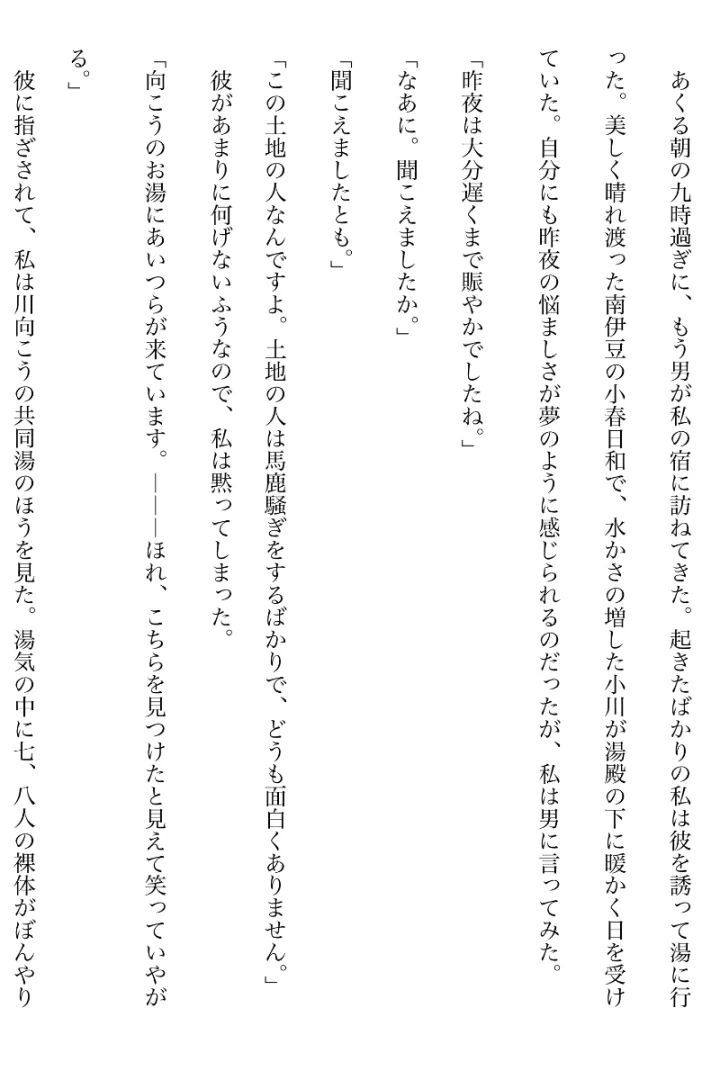
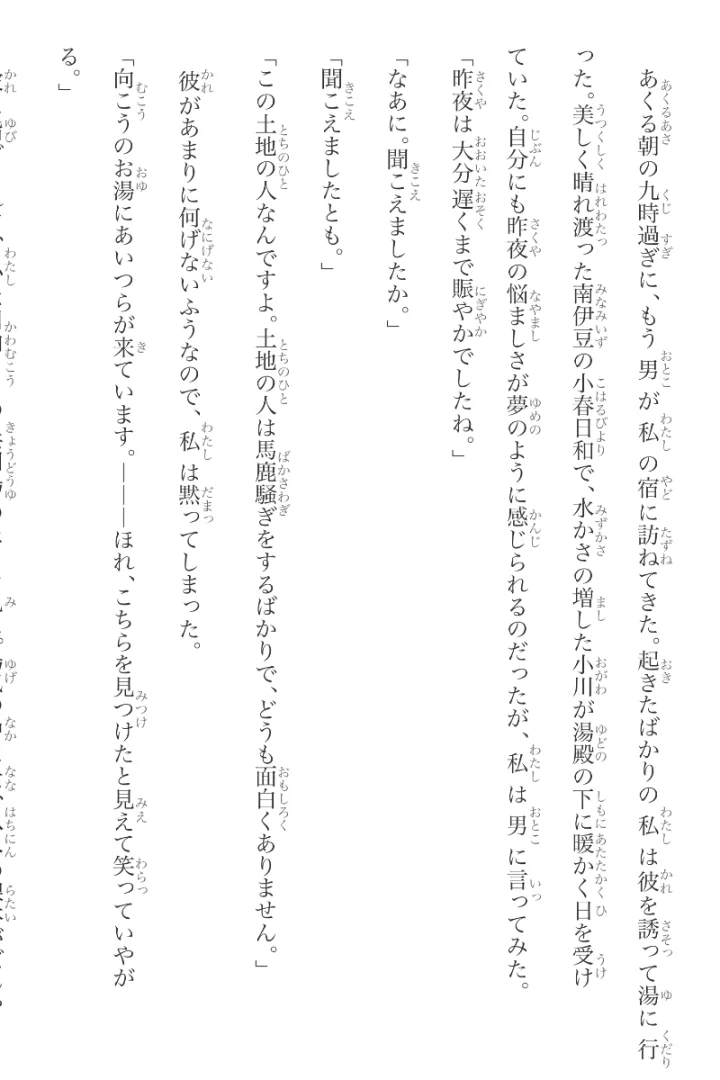
Real sample output · open an image to inspect it
Add furigana to the whole PDF
- Upload the Japanese PDF. A clean digital file, a scan, a handwritten page, or a vertical, multi-column, or otherwise irregular layout can all begin here.
- Mooon rebuilds the content automatically. High-accuracy Japanese recognition reads what is visible, identifies the page structure, and organizes the result in natural reading order.
- Click Add Furigana in the Mooon Doc. Mooon adds readings above the corresponding words throughout the document.
- Review the readings you care about. If a name, specialized term, or unusual reading needs attention, correct it directly where it appears.
You do not have to extract the text into one tool, copy it into a furigana generator, and then rebuild the page somewhere else. The recognition, annotation, and editing happen around the same content.
Why most furigana generators fail on real Japanese PDFs
Furigana needs reliable Japanese text in the right order; it cannot be attached directly to pixels or to a scrambled extraction. Some PDFs contain clean selectable text. Others are scans with no text layer at all. Japanese books and papers may also use vertical columns, multiple columns, handwriting, or layouts whose copied text comes out in the wrong order.
A plain furigana generator only works after it receives usable Japanese text. Mooon handles the step before annotation as well. For a scanned or complex PDF, it first recognizes and reorganizes the content; furigana is then built on that document structure instead of on a scrambled text dump.
For a closer look at those cases, see adding furigana to a scanned Japanese PDF and reading a vertical Japanese PDF in horizontal layout.
Furigana should remain editable
Automatic furigana is especially difficult around names, places, counters, specialized vocabulary, and words whose reading depends on context. Mooon strengthens its furigana system with a large custom dictionary for these difficult readings, but no automatic system knows every rare name or every intended pronunciation.
That is why the reading is part of the editable Mooon Doc. You can correct the furigana for a word or name where you see it. The correction stays with the document instead of forcing you to regenerate the whole page.
The PDF becomes more than an annotated page
For PDFs, furigana can stay beside paragraph translation, dictionary and explanation tools, and audio in the same reading environment. The body text and paragraph translations are editable too. When you return to the document, its source text, readings, translations, and your edits remain connected.
This is the larger change Mooon makes: a PDF that was difficult to select, read, or annotate becomes a Mooon Doc you can read now, refine for your purpose, and keep. When you need a copy elsewhere, export it in the format that fits the next step.
What to expect from difficult files
Clear digital PDFs usually provide the strongest starting point. Small, dense, blurry, skewed, or damaged scans are harder for OCR, and unusual page structures may need correction. Mooon creates a strong first version and lets you edit the parts that matter without starting over.
FAQ
Can Mooon add furigana to a scanned Japanese PDF? Yes. Mooon performs Japanese OCR first, then adds furigana to the recognized text. The clarity and size of the original print affect recognition quality.
Can it handle vertical Japanese PDFs? Yes. Mooon recognizes vertical and multi-column layouts and reorganizes the content into a horizontal reading flow before you add furigana. Many users use the same workflow to digitize vertically set books and archived Japanese material, not only to annotate them.
Can I change a wrong reading? Yes. Furigana in a Mooon Doc is editable, including readings for words and names.
Does adding furigana change my original PDF? No. Mooon creates a new Mooon Doc from the content; your original file remains unchanged.
Can I export the result? Yes. Mooon Docs can be exported as PDF or EPUB.
Add furigana to a PDF you already want to use
Bring in a paper, book, textbook, or handout. Mooon will turn it into a document with editable furigana you can continue reading and working with.